For a long time, publishing a post on this blog worked like this:
write in VSCode
drop images into a separate folder
double-check that every path was right
push to git
SSH into the server and run a script
Hope
Check page, find problem
Repeat
For anyone currious of the script here it is:
#!/bin/bash
cd /home/zev/zev.se
git pull
sudo rm -rf /opt/docker-data/www-public/*
sudo hugo -d /opt/docker-data/www-public -s /home/zev/zev.se/zev
It worked. It was fine. But it was one more thing to remember, one more reason to keep a terminal open, and one more thing to debug when the server had drifted out of sync with what I expected. Not fragile exactly — but manual in a way that always felt unfinished. And honestly, probably the reason not many post got written. I also needed a project to try some AI on to give me ammo on why you shoulden’t let AI go free in production. And what better way then fixing my already broken pipeline?
So I fixed it.
The old way
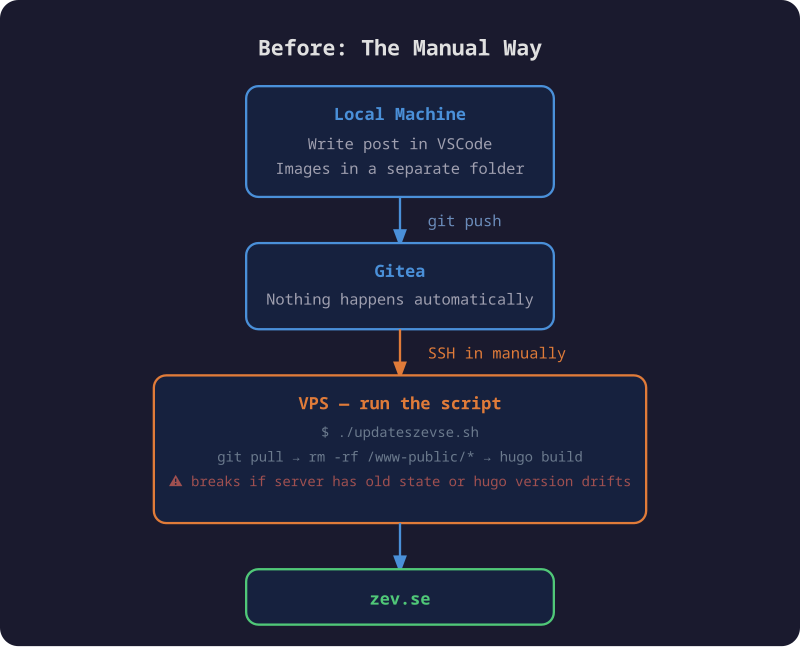
As you might expect the image is AI-generated, and as all true AI generated images it also contains faults. I used to push to github. I switched to Gitea. In any case it clearly shows the gap that is me having to push to git, ssh to server, run script, check, hope I didn’t mess any file up, because the scipt nukes the webroot.
The images situation was its own small frustration. They lived in a separate folder, references had to be typed correctly, and if something was off you wouldn’t know until you checked the live site. Also this means they wont render in any markdown editor.
The new way
Traiding an evening now for less hassle every time I write a post in the future. Or at least until the automation stops working.
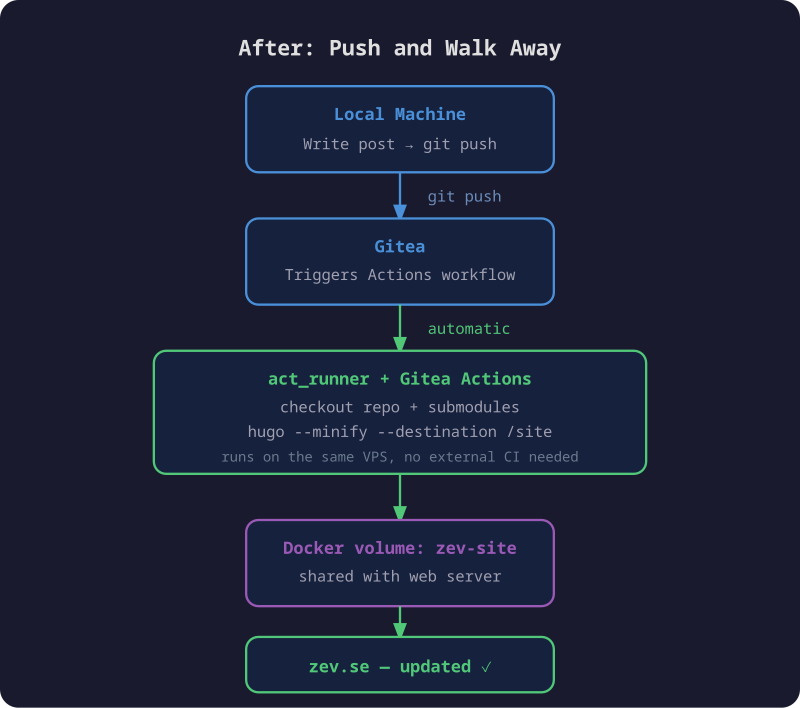
It works like this: write the post, push to Gitea, walk away. A few seconds later the site is updated.
The pipeline is straightforward:
- Push triggers a Gitea Actions workflow
- A self-hosted
act_runneron the same VPS picks up the job - It checks out the repo (including the theme submodule), installs Hugo, and builds
- The output lands in a Docker volume shared with the web server
static-web-serverpicks it up immediately — no restart needed
The workflow itself is small:
name: Deploy

on:
  push:
    branches:
      - main

jobs:
  build:
    runs-on: ubuntu-latest
    steps:
      - name: Checkout
        uses: https://gitea.com/actions/checkout@v4
        with:
          submodules: recursive

      - name: Install Hugo
        run: |
          curl -fsSL https://github.com/gohugoio/hugo/releases/download/v0.152.0/hugo_extended_0.152.0_linux-amd64.tar.gz \
            | tar -xz -C /usr/local/bin hugo

      - name: Build
        run: hugo --minify --destination /site
Hugo writes directly to /site, which is a named Docker volume mounted into the
build container. The web server has the same volume mounted at /public. No copy
step, no rsync, no restart.
The one thing that took a while
Getting the volume mount to work took longer than expected. act_runner has a
security feature where it silently ignores any volume mounts that aren’t explicitly
whitelisted — even named Docker volumes. Every run logged:
[zev-site] is not a valid volume, will be ignored
The fix is one line in the runner config:
container:
  valid_volumes:
    - zev-site
Without that, Hugo builds successfully, outputs to what it thinks is /site, and
the files vanish when the container exits. The site never updates. The logs show
a successful build. It’s a good one to know about.
The repo changes
While I was at it, I cleaned up the structure. The old repo had accumulated some
things worth fixing: content nested inside a zev/ subdirectory for no good reason,
images in a shared static/images/ folder divorced from the posts that used them,
custom SCSS and layout overrides that the theme now handles on its own, and the
compiled public/ output sitting in version control — meaning every deploy added
hundreds of generated files to git history, making it hard to see what actually
changed between posts.
BEFORE                                 AFTER
──────────────────────────────         ──────────────────────────────
zev.se/                                zev.se/
├── zev/                               ├── config.toml
│   ├── config.toml                    ├── content/
│   ├── content/                       │   └── posts/
│   │   └── posts/                     │       └── my-post/
│   │       ├── post-one.md            │           ├── index.md
│   │       └── post-two.md            │           └── image.png
│   ├── static/                        ├── layouts/
│   │   └── images/                    │   └── shortcodes/
│   │       ├── image1.png             ├── themes/
│   │       └── ...                    │   └── hugo-coder/
│   ├── assets/   ← custom SCSS/JS     └── .gitea/
│   ├── layouts/  ← theme overrides        └── workflows/
│   ├── public/   ← build output                └── deploy.yml
│   └── themes/
│       └── hugo-coder/
└── README.md
Posts are now page bundles — each post lives in its own folder with its images
alongside the index.md. No separate image directory, no path to get wrong.
The pipeline builds public/ fresh on every deploy and throws it away. Git
history is just content.
Worth it
The script is gone. Publishing is just writing and pushing. The pipeline is simple enough that there’s not much to break, and when something does go wrong the Gitea Actions log tells you exactly where.
This post was the first one published through it. It went smooth… I hope.